My Human–AI Reporting Assistant
Personal project- 2025
Lead designer
I got tired of manual project tracking, so I built an AI assistant to monitor project progress and flag risks early, giving me my time back for the high-value work.
My role
As Lead Designer, I spend hours each week creating progress updates for cross functional partners. I saw an opportinity to reduce manual work, improve clarity, and build a practical AI project to deepen my skills.
I designed and built the a AI-assisted workflow that helps me track project progress faster, flag risks early, and share updates automatically. Through this project, I strengthed my experience with AI workflow design.
#AI UX #System thinking #Workflow & automation design #Prompt design & AI interaction design #Human-in-the-Loop Design
Key impacts
Reduced weekly reporting time by ~60–80%
Boosting communication speed by 90%
Surfaced risks earlier and reducing missed blockers
Overview of my AI Assistant
The solution is a no-code Human–AI reporting assistant that transforms fragmented weekly design updates into a clear, consistent, automated status summary. I designed this as a service workflow that combines structured inputs, AI-generated synthesis, and human review step to eliminate manual reporting, make reporting faster, clearer and more reliable.
Approach
-
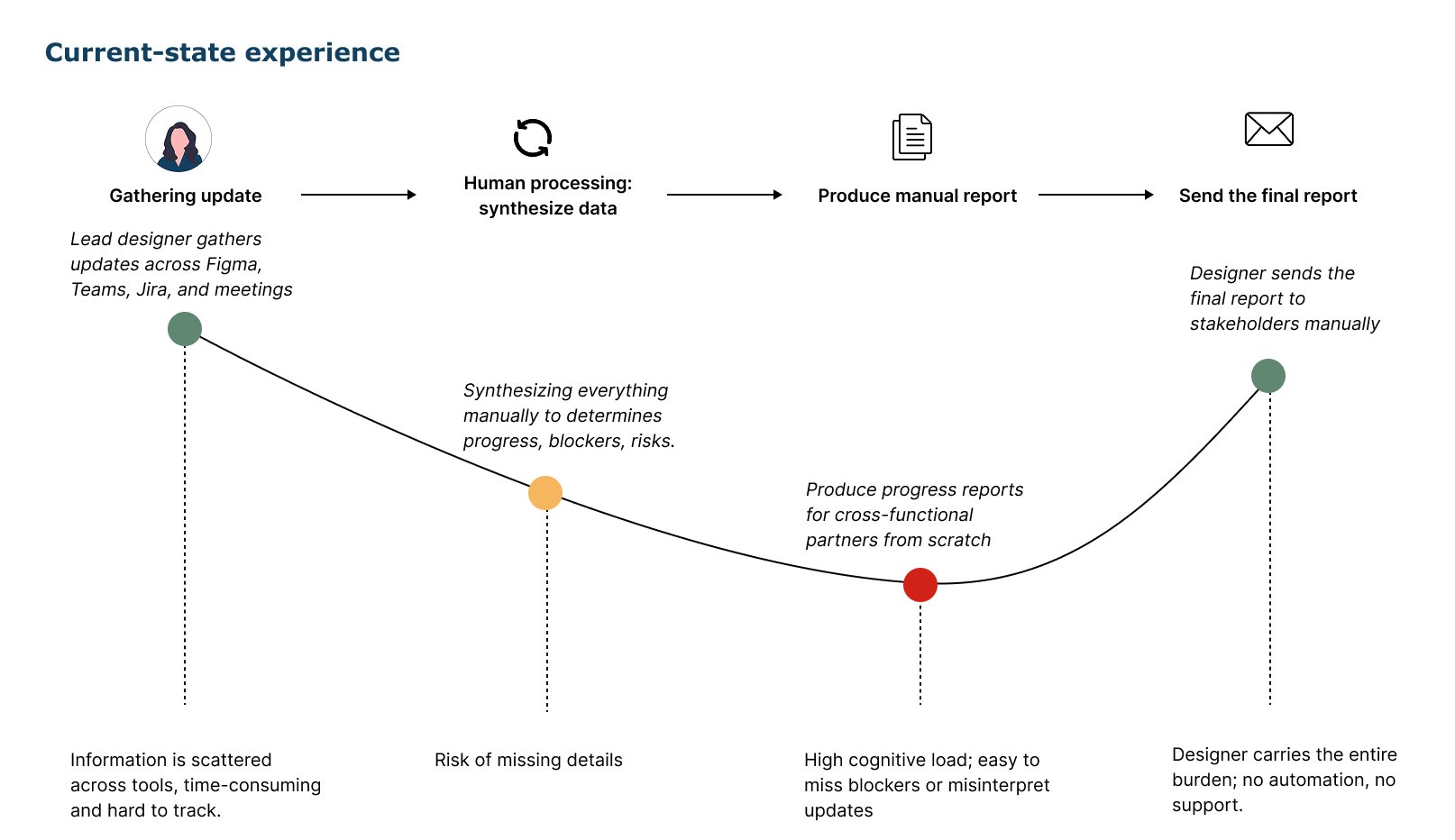
I mapped the end-to-end reporting workflow, identified where time and clarity were being lost, and defined the functional and data requirements needed for a reliable Human–AI system.
Methods: Current-state workflow map, reporting requirements & data needs
-
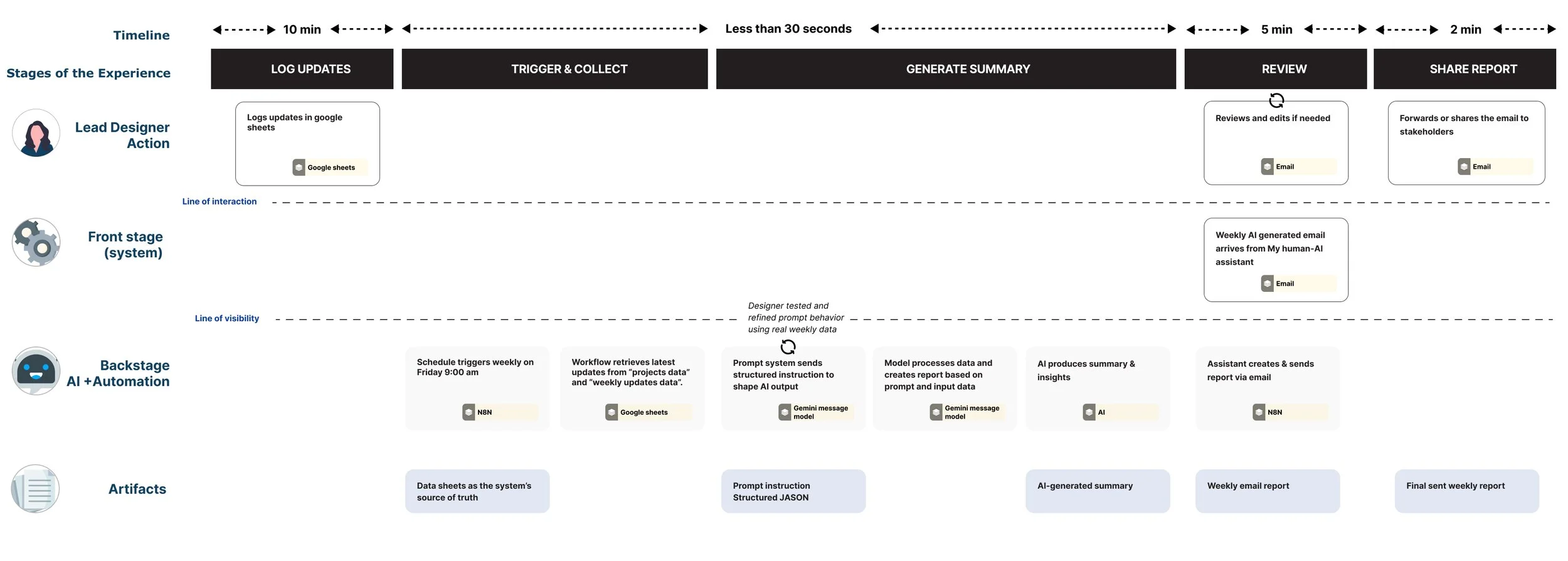
I designed the service blueprint for the full system, establishing data schemas, touchpoints, and clear responsibility boundaries between human and AI automation to ensure trust, control, and scalability.
Methods: Service blueprint, human-AI interaction
-
I built the first working prototype in n8n, using real weekly updates to test and refine the prompt logic, interaction flow, and generated outputs. I also validated how AI responds under real conditions.
Methods: Model in the loop prototype using n8n, iteration with prompt system & validated output
-
I connected the structured inputs, workflow logic, and AI summaries into a seamless reporting assistant, enabling automated weekly updates and maintaining a human review loop for accuracy and clarity.
Methods: Deployed Human-AI reporting system, workflow refinemt using live usage
Key components
01
A structured input system for reliable AI behavior
A two-sheet data model (Projects + Weekly Updates) that captures updates in a predictable, machine-readable format.
This provides the assistant with clean inputs, reduces ambiguity, and improves the consistency of AI-generated summaries.
02
A Human-AI workflow blueprint
A service blueprint that defines how humans and AI collaborate to ensures clarity, control, and transparency in the system.
✓Humans log updates, blockers, and next steps
✓The AI synthesizes and structures summaries
✓Humans review and adjust the final output.
03
Prompt system for reliable AI behavior
A prompt system that guides the AI to produce reliable and clear summaries and insights
✓Clear sections
✓No hallucinations or invented data
✓How to treat missing data
✓Prioritization based on impact
✓Concise, consistent tone
04
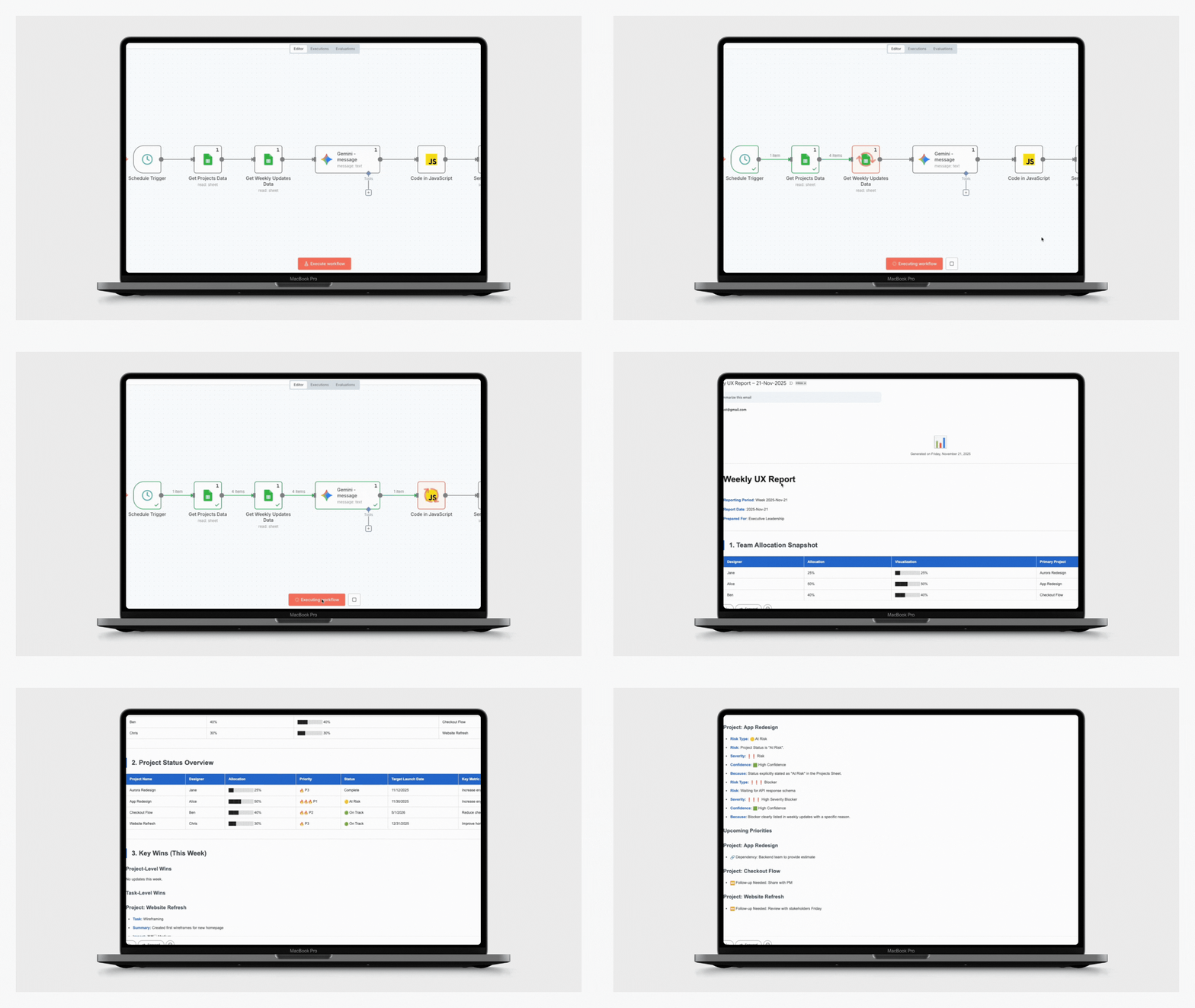
Automated workflow in n8n
A no-code workflow that automates the reporting cycle and connects every part of the Human–AI system
✓ Pulls weekly updates into a structured format
✓ Runs the prompt system for AI summaries & insights
✓ Formats and publishes a report via email
✓ Maintains a human review step for trust and accuracy
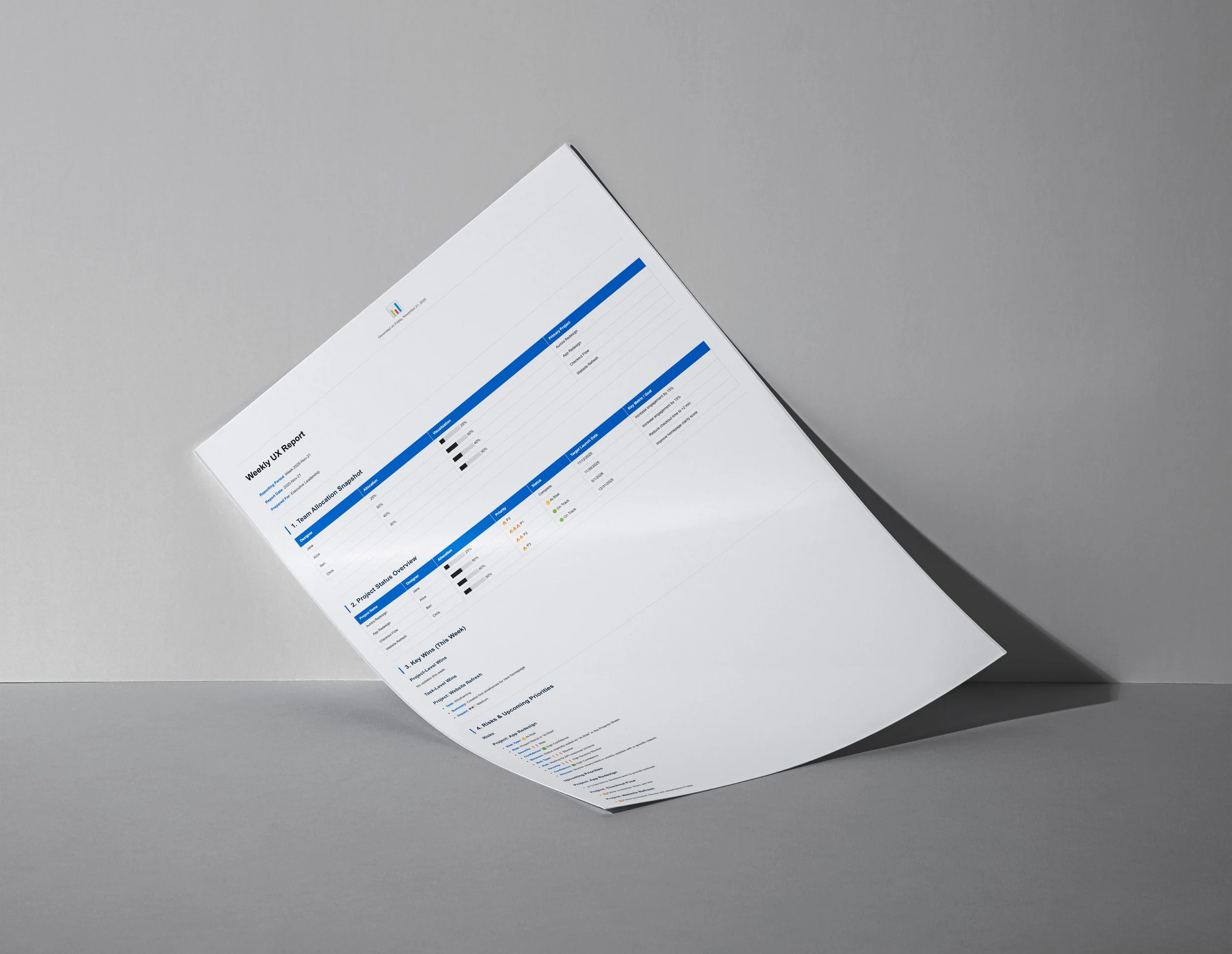
Glimpse of outputs
Prompt design
I designed the prompt system as the interaction layer between structured project data and the AI model. The goal was to produce a consistent, executive-ready weekly UX report with zero hallucinations and maintaining human oversight. The prompt sets a clear structure with tables, sections, visual indicators, and fallback text like “No updates this week.”
To keep the assistant accurate and trustworthy, I added guardrails
Guardrails
use only provided data, never infer missing information, surface inconsistencies only when visible, preserve blanks, and return explicit fallbacks for empty sections.
Iteration & Refinement
Refined the prompt through multiple iterations using real weekly updates
Early outputs were uneven, so I tightened tone, prioritization, ordering, and formatting. I also designed rules for edge cases like missing data, mismatched IDs, and conflicting entries—making the system increasingly robust and reliable.
Prompt Evolution: V1 → V2 → Final”
Prompt Version 1
✓Generic role (“business analyst”)
✓ Minimal guardrails → inconsistent outputs
✓ No visualization (difficult for executives to scan)
✓ No Project ID → Name mapping
✓Lacked risk structure or confidence ratings
✓Could infer/guess details if missing
✓Summaries mixed tasks, risks, and accomplishments
✓ Not optimized for email reporting
Final Prompt
✓ Domain-specific persona (“analyzing design team progress”)
✓ Strict non-hallucination rules (IDs, tasks, dates, risks)
✓ Project ID → Project Name validation + data integrity checks
✓ Email-safe visual system (ASCII bars, icons, severity markers)
✓ Tiered logic for Key Wins (Project-Level + Task-Level)
✓ Strongly constrained risk framework + confidence scoring
✓ Structured data ingestion using raw JSON for accuracy
✓ Executive-ready layout optimized for weekly reporting
Report
Behind the work
-
I wanted to show how practical, system-level AI design can turn a manual reporting process into a fast, reliable, executive-ready workflow. By combining structured data, prompt engineering, and human-in-the-loop review, I built an AI assistant that transforms fragmented updates into clear, trustworthy summaries complete with guardrails, visual indicators, and zero hallucinations.
-
I learned that good AI design comes down to being clear, setting the right rules, and working together with the system. By treating the prompt like a real product, leaning up the inputs, adding guardrails, and planning for edge cases the workflow became much more reliable.
And the biggest lesson was this: AI doesn’t replace human judgment, it supports it. It helps make reporting faster, clearer, and more dependable.